Stitch Patch: A Creative Sewing Font for Custom Designs
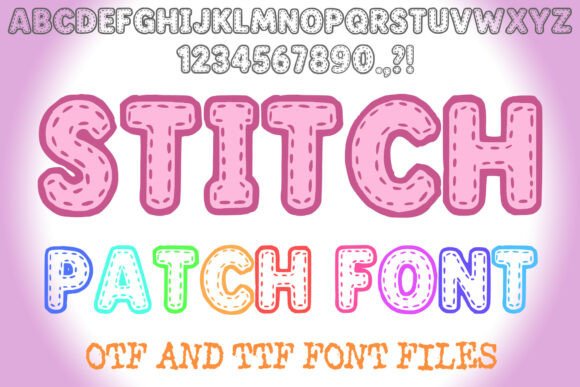
Stitch Patch is a unique embroidery-style font that brings a hand-stitched look to digital designs. Whether you're creating custom apparel, crafting personalised gifts, or designing digital assets, this font gives your text a charming, handmade appearance. The Stitch Patch Alphabet Lettering ABC Embroidery Text Font comes in both OTF and TTF formats, making it compatible with a wide range of design software. With support for capital letters, numbers, and basic punctuation, it’s a versatile tool for anyone who wants to add a touch of stitched elegance to their projects.
What Makes Stitch Patch Special?
The standout feature of Stitch Patch is its authentic sewing style. Each letter mimics the look of real embroidery thread stitched onto fabric, giving your text a tactile and artistic feel. This font is especially appealing to those who love crafting, DIY projects, or want to simulate handcrafted visuals in digital work. Because it's available in both OTF and TTF formats, it works seamlessly in programs like Adobe Photoshop, Illustrator, Canva, and more.
Unlike many decorative fonts that are limited to design use, Stitch Patch is fully functional for both print and digital applications. Whether you're making t-shirts, mugs, greeting cards, or social media graphics, this font adapts well to different mediums. You can also customise the colours to match your brand or personal style, giving you full creative control.
Who Can Benefit from Using Stitch Patch?
This font is ideal for a wide audience. Beginners can easily use it in design tools without needing advanced skills. Hobbyists and crafters love it for creating custom items like embroidered patches, fabric art, or handmade cards. Small business owners and entrepreneurs can use it for branding elements like packaging, labels, or promotional materials. Educators and bloggers can incorporate it into printable resources or digital content to make their visuals more engaging.
Freelancers and designers appreciate the flexibility it offers in client work, especially when a handmade or nostalgic aesthetic is desired. Whether you're working on a personal project or a commercial design, Stitch Patch provides a professional yet approachable look that stands out.
Where and How to Use Stitch Patch
There are many practical applications for this font across different creative fields. Here are a few examples:
- Custom Apparel: Use Stitch Patch to create embroidered-style names or slogans on t-shirts, hats, or jackets.
- Home Decor: Design throw pillows, wall art, or quilt labels with a stitched appearance.
- Printables: Create planners, invitations, or greeting cards with a handcrafted touch.
- Branding: Add a unique, artisanal feel to your logo or packaging labels.
- Social Media: Make eye-catching Instagram stories or Pinterest graphics with embroidered-style text.
Since it supports both OTF and TTF file types, you can use Stitch Patch in most design programs and even on platforms like Cricut or Silhouette for cutting machines. This makes it perfect for digital crafting and print-on-demand businesses as well.
Getting Started with Stitch Patch
If you're new to using decorative fonts, getting started with Stitch Patch is simple. After downloading the font files, install them on your computer just like any other font. Then, open your preferred design software and select Stitch Patch from the font menu. You can type out words, adjust the size, and customise the colour to suit your needs. Because it includes capital letters, numbers, and basic punctuation, you can create everything from short phrases to full product labels.
For best results, consider pairing it with subtle background textures or fabric-like patterns to enhance the embroidered effect. If you're using it for physical embroidery, you can trace the font design onto fabric or use it as a guide for hand or machine stitching.
Things to Consider Before Using Stitch Patch
While Stitch Patch is a versatile and easy-to-use font, there are a few important points to keep in mind before diving in:
- Check Licensing: Make sure the font allows for both personal and commercial use, especially if you're planning to use it in a business or client project.
- Compatibility: Confirm that your design software supports OTF or TTF fonts. Most modern tools do, but it’s always good to double-check.
- Scalability: While the font looks great at various sizes, very small text may lose some of its detail due to the stitching effect.
- Design Balance: Because it's a decorative font, it works best as a headline or accent text rather than for long paragraphs.
By keeping these considerations in mind, you can ensure that your designs look polished and professional while making the most of what Stitch Patch has to offer.
Final Thoughts on Stitch Patch
Stitch Patch is more than just a font — it's a creative tool that bridges the gap between digital design and traditional embroidery. Its charming aesthetic, combined with practical usability, makes it a valuable addition to any designer's toolkit. Whether you're a beginner exploring font design for the first time or a professional looking for a fresh visual style, Stitch Patch offers a unique way to personalise your work and connect with your audience.