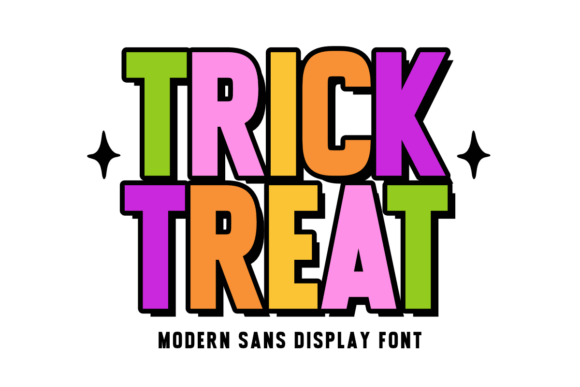
Tricktreat Regular: A Spooky-Cool Font Done Right
If you're designing Halloween-themed projects and want a font that’s both bold and full of personality, Tricktreat Regular might be just what you're looking for. This modern sans serif display font brings a cheerful, colorful twist to seasonal design, perfect for everything from party invitations to sublimation mugs. But like any design tool, it’s easy to misuse or overlook key details that can impact your final result.
What Makes Tricktreat Regular Stand Out?
Tricktreat Regular shines with its thick, chunky letterforms and playful energy. It's designed to be eye-catching without sacrificing readability, even at smaller sizes. The font’s clean structure and vibrant character make it ideal for festive, family-friendly designs. Whether you're a small business owner creating Halloween merchandise or a hobbyist making classroom crafts, this font can add a lively touch to your work.
Common Mistakes When Using Tricktreat Regular
Despite its appeal, many users fall into traps that can hurt their design quality or project effectiveness. Here are some of the most common issues and how to avoid them:
Mistake #1: Using It for Long Blocks of Text
Tricktreat Regular is a display font, not a body font. Its bold, decorative style works best for headlines, titles, and short text elements. Using it for long paragraphs can strain the reader’s eyes and reduce clarity, especially in print or on screens with lower resolution.
Better approach: Save Tricktreat Regular for headlines, logos, or short captions. Pair it with a clean sans serif or serif font for body text to maintain readability and visual harmony.
Mistake #2: Overlooking Licensing Details
Some designers download fonts without checking usage rights, which can lead to legal issues—especially if you're using the font for commercial products like Halloween tote bags or digital marketing materials.
What to check: Always verify the license type. Make sure it allows for commercial use, web embedding (if needed), and resale in physical or digital goods. If unsure, contact the font creator or vendor for clarification.
Mistake #3: Not Previewing Across Devices and Sizes
While Tricktreat Regular is designed for readability, its thick strokes may cause issues when scaled too small or viewed on low-resolution screens. Some users assume it works universally without testing, only to find the text appears muddy or illegible.
Smart solution: Preview your design on different devices and at various sizes before finalizing. If you're printing on fabric or vinyl, test a sample to ensure the text remains crisp and clear.
Designing with Tricktreat Regular: What to Watch For
Even experienced designers can miss small but important details when using a bold, thematic font like Tricktreat Regular. Here are a few more pitfalls to avoid:
Overusing Color Without Contrast
Because the font has a playful, colorful spirit, it's tempting to use it with bright, busy backgrounds. However, poor contrast can make the text hard to read and visually overwhelming.
Tip: Stick to high-contrast combinations. For example, use white or black text over a dark orange background instead of yellow over light orange. This helps maintain readability while keeping the festive vibe.
Ignoring Kerning and Spacing
Display fonts often have default spacing optimized for headlines, but not all design software adjusts this automatically. If letters appear too tight or too far apart, it can affect legibility and overall aesthetics.
Fix: Manually adjust kerning and tracking, especially when scaling the font for different uses. This small tweak can make a big difference in how your text looks and feels.
Choosing the Right Projects for Tricktreat Regular
Tricktreat Regular works best in contexts where fun and visibility are key. It’s ideal for:
- Halloween party invitations
- Kids’ apparel and accessories
- Seasonal signage and posters
- Classroom decorations and crafts
- Print-on-demand items like mugs and tote bags
However, it's not the best choice for formal or minimalist designs. If your project needs a more subdued or elegant tone, consider pairing it with a complementary font or choosing a different typeface altogether.
Before You Download or Buy Tricktreat Regular
Before committing to any font, including Tricktreat Regular, take a few moments to evaluate your needs and the font’s features:
- Check the format: Is it available in OTF, TTF, or both? Make sure it’s compatible with your design software.
- Look for stylistic extras: Does it include alternate characters, ligatures, or multiple weights? These can add versatility to your design.
- Test a sample: Many font marketplaces offer free previews. Use them to see how the font looks in your intended context.
- Read user reviews: Other designers may have encountered issues or shared helpful tips you hadn’t considered.
Getting the Most from Tricktreat Regular
When used thoughtfully, Tricktreat Regular can elevate your Halloween-themed designs with its bold, cheerful energy. The key is to balance its lively personality with practical design choices. Pair it wisely, test thoroughly, and always keep your audience and medium in mind.
Whether you're a blogger creating seasonal graphics, a teacher making festive classroom signs, or a small business owner printing themed merchandise, paying attention to these small details can make your work stand out—without any unwanted surprises.