Bobogie Groovy: A Retro Typeface with Personality – What You Need to Know Before You Use It
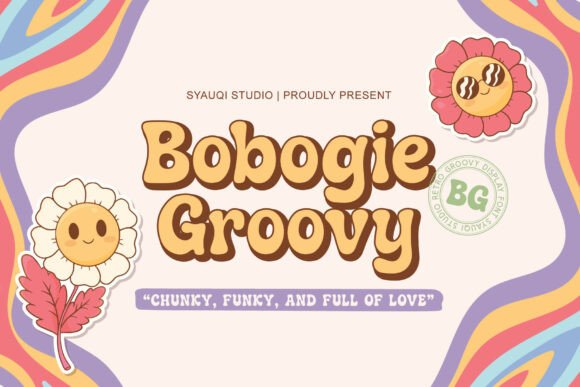
If you’ve ever wanted your design to radiate the carefree, colorful energy of the 1960s and '70s, Bobogie Groovy might just be the typeface you’re looking for. This bold, retro display font brings a mix of chunky curves, playful letterforms, and a rhythmic flow that feels both nostalgic and fresh. Whether you're designing a festival poster, a vintage logo, or a t-shirt print, Bobogie Groovy can inject a sense of fun and authenticity into your work.
But like any design tool, using Bobogie Groovy without understanding its strengths and limitations can lead to disappointing results. Many designers fall into common traps when selecting or applying this kind of stylized font. Let’s explore what to watch out for—and how to make the most of this expressive typeface.
Mistake #1: Using Bobogie Groovy for Long Blocks of Text
One of the most frequent misuses of Bobogie Groovy is applying it to body copy or lengthy text passages. Its bold, decorative nature makes it visually striking in headlines and short phrases, but readability drops quickly in longer content. The thick strokes and exaggerated curves can make letters blend together, especially at smaller sizes.
Better approach: Save Bobogie Groovy for titles, logos, or accent text. Pair it with a clean, legible sans-serif or serif font for any supporting copy. This contrast not only improves readability but also highlights the retro vibe of Bobogie Groovy without sacrificing clarity.
Mistake #2: Overlooking Licensing Details
Before downloading or purchasing Bobogie Groovy, it's crucial to check the licensing terms. Some fonts labeled as “free” come with restrictions on commercial use, while others require attribution or limit the number of users or projects.
Better approach: Always read the license agreement carefully. If you're using the font for a client project, merchandise, or digital product, confirm that you have the appropriate rights. This avoids potential legal issues and ensures your work can be used as intended without delays or redesigns.
Mistake #3: Not Testing Across Devices and Sizes
While Bobogie Groovy looks amazing on screen at large sizes, it can lose its charm when scaled down or viewed on low-resolution displays. This is especially important for digital applications like social media graphics or mobile app interfaces.
Better approach: Test the font in different sizes and on various devices before finalizing your design. Use it where it will be most effective—such as in large headlines or print materials—and avoid relying on it for small captions or interface text.
Mistake #4: Pairing It with Incompatible Fonts
Choosing the wrong companion font can clash with the retro character of Bobogie Groovy and create visual tension. Designers sometimes pick another bold or ornate font, which can lead to a cluttered appearance.
Better approach: Opt for minimalist, modern sans-serif fonts like Montserrat, Lato, or even a classic serif like Georgia. These combinations let Bobogie Groovy shine while maintaining a balanced visual hierarchy. Try using the rule of thumb: if the secondary font is too busy, simplify it.
Mistake #5: Assuming It Works for Every Retro Project
Just because a project calls for a retro aesthetic doesn’t mean Bobogie Groovy is always the right choice. Its specific '60s and '70s vibe may not align with other eras like the '80s neon look or mid-century modern design.
Better approach: Consider the specific era and mood you're aiming for. Explore other typefaces that match the time period or style more precisely. Bobogie Groovy is best suited for psychedelic, flower-power, or disco-inspired themes—so use it where those vibes are welcome.
What to Check Before Downloading or Buying Bobogie Groovy
- Character Set: Does it include uppercase, lowercase, numbers, and special characters? Some decorative fonts lack full character support, which can limit your usage.
- File Format: Check if it comes in common formats like .OTF or .TTF for broad software compatibility.
- Vendor Reputation: Download from trusted sources like reputable font marketplaces or the designer’s official site to avoid malware or poor-quality files.
- Support and Updates: Some font creators offer updates or customer support—this can be helpful if you run into issues or want to stay current with new versions.
When to Use Bobogie Groovy—and When to Step Back
Use Bobogie Groovy when:
- You're designing a vintage logo or brand identity with a retro feel.
- You're creating social media graphics or posters that need a bold, expressive headline.
- Your project celebrates the 1960s or '70s—think album covers, concert flyers, or boutique packaging.
Consider alternatives when:
- You need a font that’s readable at small sizes or for extended reading.
- Your design leans toward a minimalist or modern aesthetic.
- You're targeting a professional or corporate audience where bold display fonts may feel out of place.
Final Thoughts: Make Bobogie Groovy Work for You
With its groovy curves and bold presence, Bobogie Groovy is a fantastic addition to any designer’s toolkit—when used thoughtfully. By avoiding common pitfalls like poor font pairing, incorrect licensing, and inappropriate usage, you can ensure your projects capture the retro spirit without sacrificing quality or usability.
Always test the font in your intended context, pair it wisely, and double-check the fine print before downloading. When done right, Bobogie Groovy can elevate your design from ordinary to unforgettable—just like the era it celebrates.