Nexa Chalk: A Playful Font with Practical Power for Designers and Creators
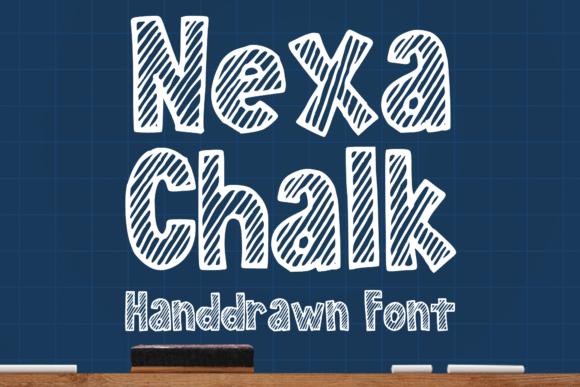
If you've ever admired the loose, expressive look of real chalk writing and wished you could bring that organic feel into your digital or print designs, Nexa Chalk might be exactly what you're looking for. This hand-drawn, shaded font captures the casual charm of natural chalk without sacrificing readability or versatility. Whether you're designing a school project, a t-shirt, a logo, or even a book cover, Nexa Chalk adds a unique, human touch that stands out in a sea of sterile, over-polished fonts.
Why Designers Love Nexa Chalk
One of the main reasons designers gravitate toward Nexa Chalk is its ability to blend personality with practicality. It’s not just a novelty font—it’s built to perform across a wide range of applications. From playful children’s book illustrations to modern brand identities, Nexa Chalk adapts without losing its character. Its shaded texture gives depth to text, making it ideal for stickers, comics, and packaging designs where visual interest matters.
What sets it apart is its handcrafted authenticity. Unlike many chalk-style fonts that feel artificial or overly stylized, Nexa Chalk maintains a natural, slightly uneven texture that mimics real chalk strokes. This makes it feel more personal and less generic—perfect for creatives who want to communicate warmth, creativity, or approachability in their work.
Common Mistakes When Using Nexa Chalk (And How to Avoid Them)
Despite its popularity, Nexa Chalk is sometimes misused, which can lead to frustrating results. Here are some common pitfalls and how to steer clear of them:
1. Overlooking Licensing Details
One of the most overlooked aspects when downloading or purchasing Nexa Chalk is the licensing agreement. Some versions of the font, especially free ones, may only be suitable for personal use. Using them in commercial projects without the proper license can lead to legal issues or unexpected costs later.
Better approach: Always check the licensing terms before using Nexa Chalk in any project intended for sale or promotion. If you're unsure, opt for a commercial-use license to avoid complications down the line.
2. Ignoring Kerning and Spacing Adjustments
Because Nexa Chalk is a hand-drawn font with texture and shading, standard kerning (the spacing between characters) may not always look balanced. Some letters might appear too close or too far apart, especially at larger sizes.
Better approach: Take a few extra minutes to manually adjust the kerning and tracking when using Nexa Chalk in your design software. This small tweak can make your text look more polished and intentional.
3. Using It in Long Blocks of Text
While Nexa Chalk shines in headlines, logos, and short phrases, it's not ideal for long paragraphs. Its textured strokes and playful style can become hard to read when used extensively.
Better approach: Reserve Nexa Chalk for titles, subheadings, or short bursts of text. Pair it with a clean sans-serif or serif font for body text to maintain readability and contrast.
4. Assuming All Chalk Fonts Are the Same
There are many chalk-style fonts available, but not all offer the same quality or versatility. Some may look similar at a glance but fall short in terms of character variety, texture consistency, or technical performance.
Better approach: Compare Nexa Chalk with other chalk fonts by testing them in your intended application. Look for features like alternate characters, multilingual support, and texture consistency across different sizes.
Choosing the Right Version of Nexa Chalk
Before you download or purchase Nexa Chalk, it's important to confirm you're getting the right version for your needs. Some sources may offer outdated or incomplete font sets. Others may bundle it with unnecessary add-ons or restrict usage in unexpected ways.
- Check the source: Stick to reputable font marketplaces or the original designer’s site.
- Look for updates: A regularly updated font usually means better support and bug fixes.
- Verify file formats: Make sure the package includes common formats like OTF or TTF that work with your design software.
Design Tips for Getting the Most Out of Nexa Chalk
Here are a few practical tips to ensure your use of Nexa Chalk enhances your design rather than hinders it:
- Pair it wisely: Combine Nexa Chalk with a clean, modern font to create visual contrast and balance.
- Use it for accents: Incorporate it into illustrations, captions, or background text for a subtle but engaging effect.
- Test in context: Always preview Nexa Chalk in your final design environment—especially if it’s going to print or be used on a website.
- Respect its texture: Avoid using anti-aliasing or smoothing settings that can blur the chalk effect and reduce its charm.
When Nexa Chalk Isn’t the Best Choice
While Nexa Chalk is incredibly versatile, there are times when it may not be the best fit. For example, if you're designing a corporate identity or formal document, a chalk-style font might send the wrong message. Similarly, if you need a font with extensive language support or advanced typographic features like small caps or ligatures, you may need to look elsewhere.
In those cases, consider using a more neutral font for the main content and saving Nexa Chalk for specific elements that benefit from its playful character.
Final Thoughts: Make Nexa Chalk Work for You
Nexa Chalk is more than just a trendy font—it’s a design tool that, when used thoughtfully, can elevate your creative work. Whether you're a beginner experimenting with design or a professional crafting a client’s brand identity, understanding its strengths and limitations will help you get the most out of it.
By avoiding common mistakes, paying attention to detail, and choosing the right application for this chalk-style font, you’ll ensure your designs are both expressive and effective. So go ahead—give Nexa Chalk a try, and see how it can bring a fresh, handcrafted feel to your next project.