Gasho Crosy: A Bold Typeface for Dynamic Creative Workflows
In the fast-paced world of design and branding, choosing the right typeface can make or break a project’s visual impact. Gasho Crosy is a graffiti-inspired font that brings urban energy and creative flair to modern design workflows. Whether you're crafting streetwear labels, promoting a hip-hop event, or launching a youth-focused marketing campaign, this typeface offers a distinct visual voice that stands out in crowded visual spaces.
Understanding Gasho Crosy in the Design Process
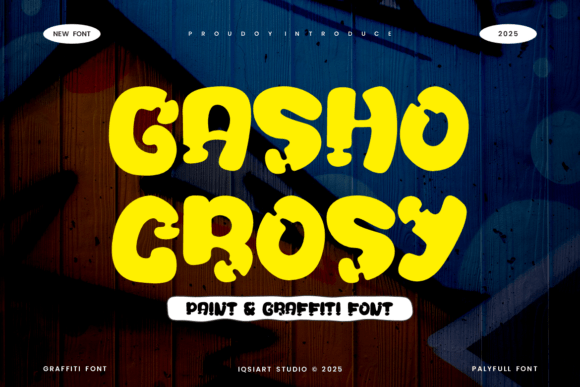
Gasho Crosy is more than just a font — it's a design tool that injects personality and authenticity into visual communication. Its bold, chunky forms and playful curves are inspired by the raw aesthetics of street art, with subtle paint-drip effects that give it a sense of motion and realism. This makes it ideal for designers and marketers who want to convey a sense of urgency, rebellion, or creativity.
When integrated early in the design process, Gasho Crosy can help define the tone and direction of a project. It works particularly well in mood boards, concept mockups, and branding guidelines where visual identity is being established. By selecting this typeface upfront, you align your typography with the overall creative direction, ensuring consistency from ideation to final delivery.
Using Gasho Crosy Across Creative Stages
Design workflows often unfold in three main stages: planning, execution, and delivery. Gasho Crosy can play a role in each of these phases, depending on how you approach your creative process.
Planning Stage: Setting the Visual Tone
Before diving into visuals, it's helpful to explore typefaces that match the emotional and thematic direction of your project. Gasho Crosy excels in brainstorming sessions where designers and stakeholders are aligning on a brand’s visual language. Its graffiti roots make it a natural fit for projects targeting younger audiences, urban culture, or edgy aesthetics.
Consider using Gasho Crosy in early concept presentations or pitch decks to give clients or team members a tangible sense of the design direction. Even if it’s not used in every element, seeing it in action can help shape decisions about color, layout, and imagery.
Execution Stage: Bringing Energy to Visual Assets
Once the direction is confirmed, Gasho Crosy becomes a working asset in your toolkit. It performs exceptionally well in applications such as:
- Event posters and flyers
- Social media visuals for music, fashion, or youth brands
- Streetwear packaging and product labels
- Brand identity elements like logos or taglines
Its high contrast and thick strokes ensure readability even at a distance, making it a go-to for print and digital signage. Designers using tools like Adobe Illustrator, Photoshop, or Figma can easily import and manipulate Gasho Crosy to suit their layout needs.
Delivery Stage: Ensuring Consistency and Compatibility
As your project nears completion, it's important to verify that Gasho Crosy displays correctly across platforms and devices. While it’s a high-impact font, it may not be web-safe by default. To maintain consistency in digital outputs, consider embedding it via web font services like Google Fonts or Adobe Fonts, especially for websites or digital ads.
For print deliverables, always package your fonts with your design files or convert text to outlines to prevent substitution issues. This ensures that your intended visual tone remains intact, whether the design is printed or viewed on screen.
Integrating Gasho Crosy with Other Tools and Resources
No font exists in isolation. Gasho Crosy works best when paired with complementary design assets and platforms. Here are a few practical integration strategies:
- Pairing with Sans Serif Fonts: Use Gasho Crosy for headlines and contrast it with a clean sans-serif for body text. This creates visual hierarchy and ensures readability.
- Color Selection: Bright, saturated colors like neon green, electric blue, or deep red enhance the graffiti vibe. Consider using gradients or texture overlays to add depth.
- Mockup Tools: Platforms like Placeit or Canva allow you to preview Gasho Crosy in real-world applications such as t-shirts, posters, and social media templates.
- Collaboration Platforms: When working with teams, upload Gasho Crosy to shared design libraries in tools like Figma or Adobe Creative Cloud to ensure everyone has access.
Practical Implementation Tips
Here are a few actionable insights to make the most of Gasho Crosy in your workflow:
- Use It Sparingly: Because of its bold nature, Gasho Crosy works best in short bursts — headlines, logos, and callouts. Avoid overusing it in long-form content where readability could suffer.
- Check Licensing: Before using Gasho Crosy commercially, confirm that you have the appropriate license. Some fonts require specific permissions for branding or resale items.
- Test Across Sizes: While it’s strong at large sizes, test how it appears on smaller screens or printed materials. Adjust spacing and weight as needed for clarity.
- Experiment with Effects: Layering shadows, glows, or outline strokes can enhance its graffiti-inspired aesthetic without overpowering the design.
Workflow Efficiency and Long-Term Use
Efficiency in design often comes down to consistency and reusability. Once you've used Gasho Crosy successfully in one project, consider saving it as part of a reusable brand kit or template. This helps maintain brand identity across multiple campaigns and reduces setup time for future projects.
For long-term use, organize your font library by tagging Gasho Crosy under categories like “Urban,” “Graffiti,” or “High Impact.” This makes it easier to find when you're starting a new project that requires a strong visual punch.
Real-World Applications and Outcomes
Gasho Crosy has been widely adopted in industries where visual energy and cultural relevance matter. For example:
- Music Industry: Used in concert posters, album covers, and merchandise to reflect the high-energy vibe of hip-hop and electronic music.
- Streetwear Brands: Incorporated into logo design and packaging to appeal to younger, fashion-forward audiences.
- Youth Marketing: Employed in campaign visuals for brands targeting Gen Z, where authenticity and bold expression are key.
These use cases show how Gasho Crosy isn’t just a stylistic choice — it’s a strategic one that aligns with brand messaging and audience perception.
Conclusion: Making Gasho Crosy Part of Your Toolkit
Whether you're a designer, marketer, or entrepreneur, Gasho Crosy offers a powerful visual tool that can elevate your creative output. Its strength lies not only in its appearance but in how it fits into a broader workflow — from concept to execution, and across both digital and physical mediums.
By understanding how to integrate it effectively with other tools, manage its use across platforms, and apply it strategically in your projects, you can harness the raw energy of street art and turn it into compelling, professional-grade design.